

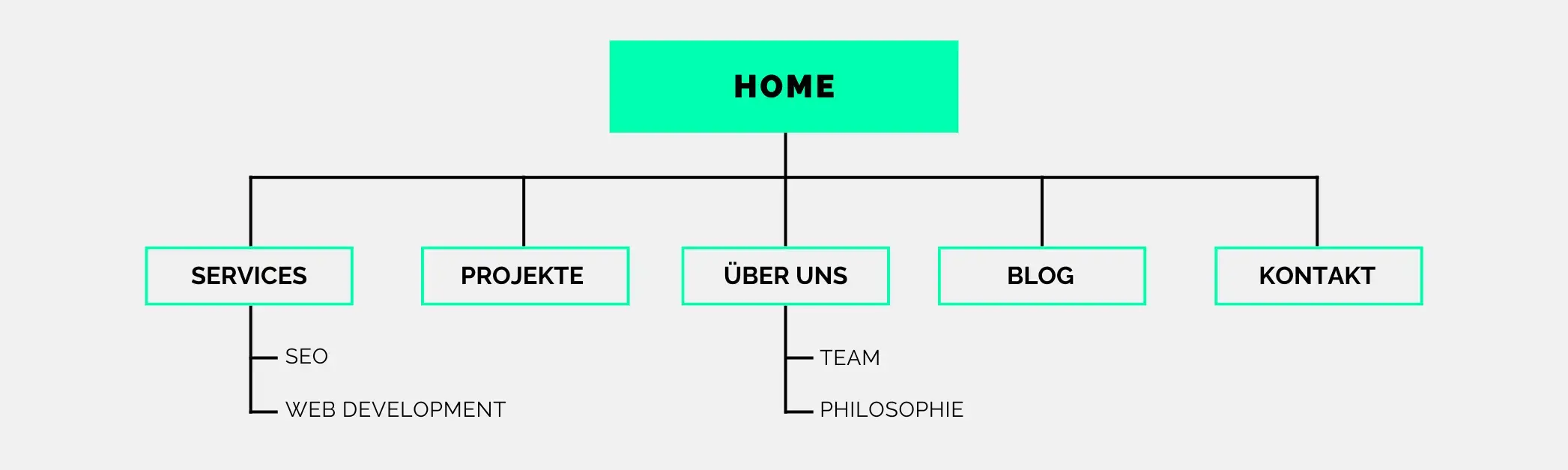
Nowadays, online marketing is of fundamental importance for companies in every industry and of every size. To survive in the growing competition for customers and skilled workers, your brand name should, among other things, be visible in well-known search engines. Your sitemap is an effective factor for an improved ranking. Nevertheless, this aspect is often overlooked when creating marketing strategies.
If you have not yet included your sitemap in your search engine optimization, you should read on. We will tell you what a sitemap is and why it is so important. We will explain how a sitemap generator works and show you how to create a sitemap.
Definition: What does sitemap mean?
The English term “Sitemap” comes from the IT sector, but is particularly important in online marketing. It can be translated as “page overview”. And that’s exactly what it is. Sitemaps provide structured representations of all pages on your website, including all text, video and photo files. They show the relationships and links between all page elements, making it easier for search engine crawlers to correctly capture your website. You can see which aspects you consider to be particularly important and when you last updated them. Alternative language settings or age ratings also make it easier for search engines like Google to read your domain correctly.
Professionally created sitemaps are often recommended only for large websites. However, even with only a few internal links, you should create a sitemap to ensure complete indexing. As a website operator, you can exclude a specific URL from the search at any time.
You can think of a sitemap as a clear map of your website. There are two main types:
- With an HTML sitemap, you provide an overview of all the sub-pages of your domain, visible to all your visitors. It serves as a kind of comprehensive table of contents, making it easier for users to find their way around with an easy-to-understand menu.
- You create an XML sitemap with successful indexing by search engines in mind. It contains a list of the URL of your homepage and for all subpages. You can upload your XML sitemap to the Google Search Console at any time to enable Googlebot to search your website quickly.

How important is the sitemap for the Google SEO ranking?
As a rule, Google’s crawler can find your page content without a sitemap. However, it simplifies the understanding of the arrangement and content of your files and speeds up the indexing process. The more professionally you create your sitemap, the better the crawler can capture, analyze and evaluate its content and structure. This is how it influences your position in the Google SEO ranking. And it is therefore of great importance for the visibility of your name in online marketing. In detail, a high-quality sitemap scores with the following advantages:
- It gives search engines a transparent overview of the links and content on your website. This improves indexing.
- It ensures that Google immediately discovers and indexes new page content.
- It guarantees that the Googlebot will index all subpages of your domain, even with hidden directory structures.
Sitemaps are therefore important ranking factors in your on-page website optimization.
They are particularly effective if
- your website consists of many levels and links
- you have recently created your website
- only a few external links point to your website
- your website contains many images, graphics and pictures
So, with the help of a well-created XML sitemap, you can influence the crawling and thus your ranking position.

Create a sitemap: Here’s how!
You can use various methods to create your sitemap. We present the most common ones with instructions for their respective uses.
Step-by-step: How to create your sitemap
- Content management systems allow you to easily create your sitemap using plugins.
- For WordPress websites, the SEO plugin Yoast is suitable. To use it, you have to log in to the WordPress backend and install the Yoast SEO plugin there. You can create your sitemap by clicking on the “SEO” menu item in the dashboard and the “General” and “Functions” buttons. Now switch to “Xml Sitemaps” and save your changes.
- For Joomla, the “OSMAP” plug-in for sitemaps is particularly popular. After installing the plug-in, you can set up and manage your sitemaps in the “OSMap Free” overview. Once you have edited all the settings as you wish, click on “Save”. Under “Sitemap Links” you will find an HTML and an XML view.
- If you do not use a CMS platform or have customized websites, a sitemap generator will help you. Search the internet for free tools to create your sitemap manually and select your favorite sitemap generator. As soon as you enter your URL in the predefined field, it scans your website and automatically generates an XML sitemap. Once the sitemap is created, download it to your PC.
- From your computer, upload the XML sitemap to the root directory of your website. It will automatically be named “sitemap.xml”, but you can also use your own file name. Make sure that the page is publicly accessible.
- Inform Google that your website is complete. You can do this by adding an entry to the robots.txt file or by using Google Search Console.
- If you use a sitemap generator, make sure you immediately update it with new entries or changes to the page structure. SEO plugins usually do this for you automatically.
- Make sure that every URL in your sitemap works.
- Exclude unimportant pages such as your privacy policy from being indexed.
Note: For large websites, it is recommended to create separate sitemaps for blogs, products or categories. This makes it easier for the crawler to organize your content correctly.