

Headlines
Perhaps the word headings sounds familiar to you? Surely you have already worked with them, for example in a project with Microsoft Word. Here, headings are used to link tables of contents or to display titles.
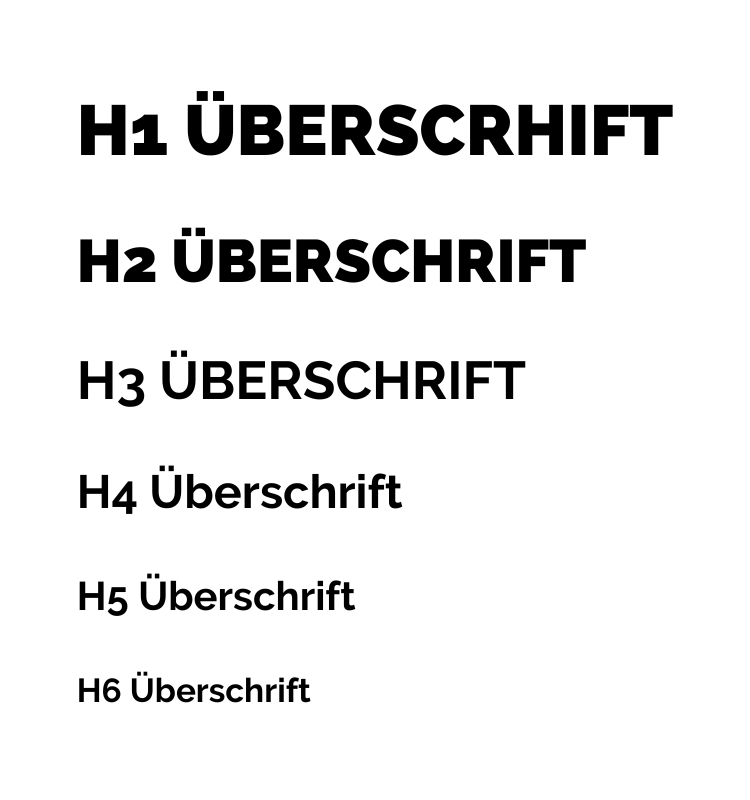
Heading hierarchies
But what is the function of the heading in the online sphere? It can be seen as a hierarchy status that announces the value of the title. Thus, the highest level starts with heading 1. In the online area, this is called H1. Then it goes on to heading 2, i.e. H2, H3, H4 and so on. Graphically, heading 1 is the largest font, after which the fonts become smaller and smaller.
It is the same in the online sector. The largest headline should also show the greatest relevance. Therefore, try to structure texts with headings. You can compare this with a visit to a library. You go in and know exactly that you are looking for a book with the title “Overnight to the Online Millionaire” (Heading 1). You have heard from a colleague who is totally enthusiastic about this book that chapter 10 is very exciting. This chapter is called “Advertising according to the 3-brain model” (heading 2). You are interested in a particular sub-chapter, namely “the brain stem” (heading 3).
Headlines and search engines
Just as explained above, the search engines work through the texts. They evaluate the headlines and the keywords contained therein. For example, a title with the headline 1, “Overnight to become an online millionaire”, can certainly have nothing to do with having children, but it is about the online millionaire business, as the keywords say.
Make sure that your titles or headlines contain your top-selling keywords so that your target group can find you with them.
Images
Pictures on a website are very important. You can present many things more attractively with pictures than you can describe in words. For this reason, it is not only important to find the right images, but also to optimise them technically in order to get the most out of them.
What many people forget is that images play a big role in online marketing. With the right images, you can generate many new visitors who land on your site via the Google Image Search. As a rule, people see the image and visit the website to which the image belongs.
However, in order to realise this potential, you need to consider a few factors:
No copies
Do you know that you can quickly check the origin of an image on Google? Go to Google and open the image search. Simply drag and drop an image into the search. Google will immediately show you the source of the image if it exists more than once. This way you can also see where certain sellers get their products from and at what price – if they don’t make their own pictures.
Google searches for similar images on the web and compares them. If a picture is available several times, it is listed. This can also be used to unmask fake profiles from Facebook, as the fakers are usually so unimaginative and take photos from the internet.
For this reason, I recommend that you use your own images.
Image size
As you have already experienced, the speed of the construction of a website is decisive for a good ranking. Images are also important factors for the structure of the page. Most of the time, you use an image exactly as you find it in the folder. You don’t pay attention to the size and resolution of the image and you have 1 to 2 megabytes for an image.
My tip is to edit each image with Photoshop so that the quality is sufficient, but the size is as small as possible. It goes without saying that with product images, such as luxury watches, cars and the like, because you want to score points with the images, you should not skimp on the image quality. For other pictures, you should keep the size as small as possible.
Photoshop offers a saving function for the web “Save for web”, where the size of the image is adjusted to the optimum.
Image naming
After the image has been adjusted, we come to the naming part. The title of the image also makes a big contribution to its success. So most images are saved with “img230923” or similar. What many people don’t know is that Google search looks for the name of the image. Likewise, the content that the image comes into contact with is evaluated, but not as strongly as the name of the image.
Let’s say you are promoting a product on your site and want to add an image to the description. At the latest now, you have to add the keyword or name with which you want to be found in the image search to the image.