

Content Management Systems
The first thing to do is to define the online presence. Depending on the presentation and functionality of the website, there are many different content management systems to build a website or webshop.
Because of the many different offers, I recommend for a rather text-based and simple website the CMS (Content Management System) WordPress. The application is simple and also clear. However, if you have decided to build a webshop, you should start with Shopify or Magento. Here, there are no limits to the store systems – from the billing system to analysis tools and much more. Here Magento and Shopify have created a strong and user-friendly product.
Design and Themes
Another point that will keep you busy while building your website is the topic of design. In addition to the technical requirements imposed by search engines, there are demands from visitors that determine whether or not a deal will be closed through their behavior on the site. Thus, the presentation is also a big factor and is recorded as “the first impression”.
Here I have another task for you: Visit ten to twenty websites and note down what you like and what you don’t like about each site. This way you have a clearly structured list of the points that you consider relevant.
For this analysis you can ask yourself the following questions:
- What is the first impression?
- How is the website structured?
- How is the design?
- How are the images?
- Do I quickly get the information I’m looking for?
- How is the customer guidance?
- What are the technical requirements?
Definition of the website structure
The website structure is one of the most important points that you have to take into account during the planning process. For this, you need to think carefully about how your website will look like, what the site will convey and what features it will contain. For this reason, before you go any further, I recommend you answer the following questions:
- Who is my target audience?
- What do I want my website to look like?
- What do I want my site to convey?
- What content should be shown in which categories?
Check navigation concept for website
Website navigation is an important digital signpost to guide visitors easily and quickly to their destination. But how can you make sure that your content, products and services are found by users? Sure, for you, the structure of your categories and the navigation is comprehensible but is it also comprehensible for your visitors?
Card Sorting
The navigation on your website is an important digital signpost to lead the visitor easily and quickly to his destination. But how can you make sure that your content, products and services are found by the users? Sure, for you, the structure of your categories and the navigation is comprehensible abe
Findability – the art of finding
We have now reached the point where we have finally defined a navigation concept with the help of test subjects. Now we go into the next phase and test the final version on new test subjects with a findability analysis. You can perform the analysis as follows:
- Find five to ten test subjects. It is important that you also consider different visitor profiles here.
- Present your navigation structure to the test subjects and ask them where they would look for certain products, services, topics, and other information.
- Make a note of the navigation points that the subjects selected.
- Note down the number of false steps that were made until a test person found the desired information.
- Now superimpose the respective steps and find out whether the current navigation concept is promising or not.
Colors and the effects
What is your favorite color? Red! Mine is not!
Not everyone has the same taste as you, and you must always keep that in mind. So, when designing the site, you should consider some points that will help you choose each color.
What many don’t realize is that colors have a great impact on our browsing behavior. This is because each color creates different associations and sensations in our subconscious.
For your selection, I’ll list the colors and the associations:
- Red: power, passion, danger – stimulates activity – calls for action.
- Yellow: knowledge, energy, intelligence – rather for advisory sides
- Green: wealth, regeneration, success, new life – for thank you pages as confirmation
- White: Purity, perfection, clarity – rather neutral, appears clean and calm
- Blue: Trust, calmness, silence – visitors stay longer
- Black: secret, luxury, noble – is rather used with caution
- Purple: royal, spiritual, fantasy – stimulates creativity
- Orange: invigoration, uniqueness, also confidence – for new products as a signal
- Gray: neutral, unattached – also associated as professional.
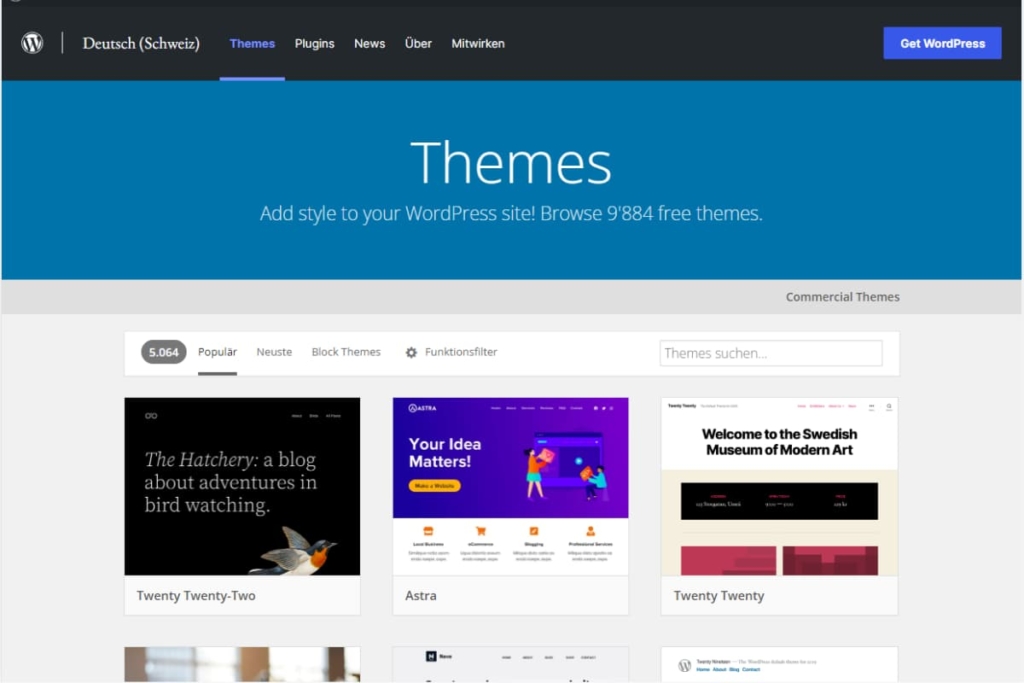
Themes & Design
You can program the entire design of a page yourself with HTML, PHP, and CSS know-how, but this can be quite time-consuming and tedious. You can also buy ready-made themes (web design templates) and customize them according to your taste. The advantage is that the entire form of the web design (“framework”) is already there and has certainly been optimized several times. You save a lot of time and what are more important nerves. Necessary adjustments can be made easily at any time.
I recommend you to have a look at Themeforest, which design is closest to your ideas. Usually a theme costs, depending on the CMS program, between CHF 35.- – CHF 130.-.
Learn HTML, CSS, and Co by yourself
Themes are simple alternative designs, ideal if you don’t want to take the effort to program a design yourself. If you do want to take up the challenge and learn the static enumeration language HTML as well as the definition language CSS, there are different possibilities. I started to strengthen my know-how in this area with the website Selfhtml.org. In different lessons, it explains to you from scratch how HTML and CSS work. For the start into this new world, Selfhtml.org was already interesting, however, the conversion from the theoretical text into practice was very difficult. What I learned didn’t always look the way I wanted it to in the implementation. My biggest problem was that I always had to find the errors myself, which was very tedious. After some time, I received a tip from a creative colleague in the design department to visit the web training courses of Codecademy.com. My first question to the colleague was, how much does this fun cost? Usually, such training is very expensive. He told me that the web training is free of charge and very interesting.
Since then I am a loyal student of Codecademy and even for FREE.
The web training convinced me with the simple and motivating explanation of each lesson. Step by step I was introduced to and accompanied in each task. The nicest thing is that if you make a mistake, it is quickly pointed out and even the correct solution is displayed with the click of a button.
The only negative point is that everything is presented only in English. If this is not a problem for you, you too will find joy in learning and quickly understanding HTML and CSS. For eager students, there are more lessons like JavaScript, jQuery, PHP, Python, Ruby, and much more.
Visit www.codecademy.com now and see for yourself this top-notch service.
Logo Design
Not only the web design but also the logo serves as a recognition factor. If you are still in the baby shoes in your project, I recommend you to have a professional logo, made by experienced designers, that will always be recognized and distinctive.
You can launch a project on various designer sites and have a logo made by professionals for as little as CHF 190. Here you should already think in advance about how your logo should look like.
You should ask yourself the following questions at this point:
- Where will my logo be used (website/paper/shirts / giveaway shirts/giveaways)?
- What should my logo convey?
- Should my logo look more modern or classic?
- What effect will the logo have on my target group?
After you have placed the order for the creation, you can send the different versions to your friends for voting. You will quickly notice which logo is well received and which is not. Of course, the honesty of your evaluators is the most important condition here.
Design your logo
As with the themes, you can have the logo created or if you want to do it yourself and save the CHF 190.-, you can create it yourself. For this, I recommend you use the image editing programs Photoshop and Indesign. But before you go into the creation phase, I recommend you draw your logo on paper. This way you have a visual “plan” to help you with the implementation.
Additionally, if you are not skilled enough in Photoshop and Indesign, you can watch tutorials on YouTube and get tips from professionals. Step by step, your logo will take on the desired form and is thus the fastest way to a small work of art.