

The quality of the UX determines whether visitors to your website linger, interact and become repeat users or customers. A well-thought-out UX goes beyond pure design; it encompasses the user’s entire interaction with your website, from the ease of navigation to the speed at which content loads and how intuitively users can achieve their goals.
In this complex interplay of design, functionality and user needs, there are proven rules and principles that can make the difference between an average and an exceptional website. As a leading web agency, ONELINE understands the nuances of effective UX design and how it contributes to the ultimate success of a website. In our blog, we share crucial do’s and don’ts to consider when planning, designing and developing your web presence. These guidelines are the result of years of experience and expertise in creating user-centered websites that not only look appealing, but also function seamlessly.
In this article, we present essential do’s and don’ts that contribute to an improved user experience. Learn how to structure and design your website so that users can navigate intuitively and find their way around with ease.
The UX do’s and don’ts at a glance
Do: Understand your target group

The foundation for any successful website is a deep understanding of your target audience. Before you start designing and developing, it’s important to know who your users are, what they need and how they want to interact with your website. By understanding the specific needs and preferences of your target audience, you can design a website that is not only appealing, but also functionally meets their needs. This creates a stronger bond between your users and your brand, which ultimately leads to higher user engagement and conversion rates.
Do: Rely on responsive design
With the steady increase in mobile internet usage, it is essential that your website is optimized for mobile devices. A responsive website automatically adapts to different screen sizes and provides a consistent user experience across all devices.
The advantages of responsive design:
- Compatibility: your website works smoothly on all devices, which increases user-friendliness.
- SEO boost: Search engines such as Google prefer responsive websites, which leads to a better ranking in search results.
- Future-proof: With a responsive layout, your website is also equipped for future devices.
Implementation of responsive design:
- Fluid grids: ensure flexible layouts that adapt to the screen.
- Flexible media: Images and videos should be able to be scaled without loss of quality.
- Media queries: Adapt content and layouts based on the device properties.
By implementing responsive design, you ensure that your website offers an optimal user experience across all devices. ONELINE will be happy to help you integrate this important component into your web project.
Do: Clarity in navigation
Intuitive and clear navigation is essential for a positive user experience. Users should be able to find what they are looking for without any detours, which increases satisfaction and extends the time they spend on your website.
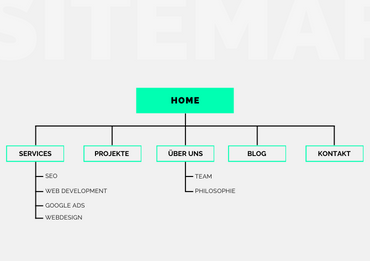
How to design user-friendly navigation:
- Simple structure: organize your content in a logical and easy-to-understand structure. Avoid complex menus that can confuse users.
- Consistency: Keep the navigation elements consistent across all pages of your website. This helps users to find their way around and understand how to get to the information they want.
- Visible menus: Place your main navigation in a prominent position so that it immediately catches the eye.
- Search function: Integrate a search bar to allow users to search directly for specific information or products.
Do: Consider accessibility
Creating an accessible website means that all people, regardless of physical or cognitive limitations, can use your content. This is not only a matter of inclusion, but also extends your reach.
Steps to improve accessibility:
- High contrast colors: use high contrast between text and background colors to improve readability for people with visual impairments.
- Text alternatives: Provide text alternatives for all visual and auditory content. This helps people with visual or hearing impairments to understand your content.
- Keyboard navigation: Ensure that your website is fully keyboard accessible to make navigation easier for users with motor impairments.
- Accessibility guidelines: Follow established standards such as the WCAG (Web Content Accessibility Guidelines) to ensure that your website meets the needs of all users.
By integrating these aspects into your web design and development practices, you will not only create a more pleasant and efficient experience for all users, but also demonstrate social responsibility and expand your target audience. ONELINE is happy to help you implement these important elements into your web projects to ensure an overall positive and accessible user experience.
Don’t: Overloaded design

A cluttered design can quickly overwhelm users. Keep your web design clear and simple to ensure a positive user experience. Avoid unnecessary elements that don’t directly contribute to the content or functionality of the website. A minimalist approach helps to focus attention on the essentials and simplify the user experience.
Don’t: Neglect the loading speed
The loading speed of your website is a critical factor for the UX. Long loading times can lead to a high bounce rate. Optimize images and use modern technologies to improve the performance of your website. A fast loading time not only improves the user experience, but also has a positive effect on search engine rankings.
Don’t: Unclear call-to-actions (CTAs)
Every page of your website should have a clear goal, and this should be emphasized through clear CTAs. Avoid vague or ambiguous calls to action that can confuse users. Clear and concise CTAs effectively guide users through the conversion process and increase the likelihood of successful interactions.
Don’t: Inconsistent branding elements
Consistent branding across your entire website builds trust and recognition. Make sure colors, fonts and style elements are used consistently to ensure a professional look. Consistent branding conveys professionalism and promotes user trust in your brand.
Paying attention to these UX do’s and don’ts can significantly improve the user experience of your website. At ONELINE web agency, we understand the importance of UX in web design and web development. Our experts are ready to transform your website and create an optimal experience for your users. Contact us today to learn how we can help you optimize your online presence.